
GrandTotal comparison, October 2026
Data, privacy and sync, GrandTotal and MacBusinessSuite
Both apps keep your business data on your Mac and need no cloud account. GrandTotal stores a file at a location you choose, which several users can share through a cloud folder, and offers Web Access from a browser through an encrypted relay. MacBusinessSuite keeps the data in the app's container for one Mac and has no sync at all.
. Written by Marcel R. G. Berger. Sources
Side by side
| MacBusinessSuite | GrandTotal | |
|---|---|---|
| Storage | Local database in the app container on your Mac | GrandTotal file at a location you choose |
| Account | None | Not needed for the data; licence per user |
| Sync | None. Built for one active Mac, moving means backup and restore | Through a shared cloud folder, for example Dropbox; no own sync server |
| Several users | No | Yes, on the shared file |
| Mobile access | None | Web Access from a browser through an encrypted relay run by Media Atelier |
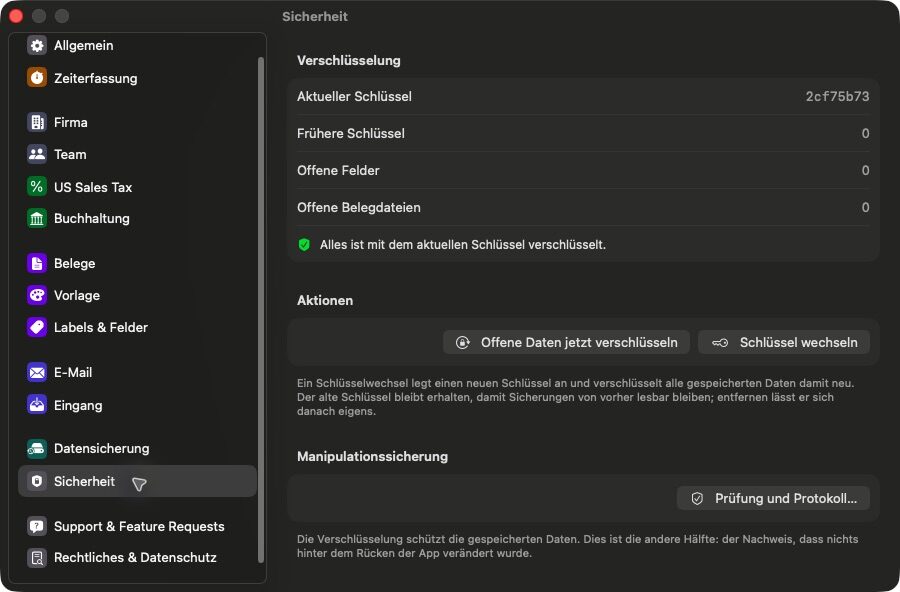
| Encryption | Bank data encrypted per field with keys in the Keychain, encrypted backups, app lock with Touch ID | Optional AES-256 encryption of the file |
| Connections | Only for features you use, such as VIES, ECB rates, your own mail server and the App Store | Licence and update checks, optional online dashboard and number reservation |
What GrandTotal offers here
- Several users on one file through a shared folder.
- Web Access from phones and tablets, the file stays on the Mac.
- Every save is signed, with a field history.
What MacBusinessSuite offers here
- No account and no sync. Records are stored only on the Mac and leave it only through features you use, such as sending mail, a VIES check or a backup you make.
- Bank data encrypted per field, keys in the Keychain.
- App lock with Touch ID, Apple Watch or your Mac password.
- Automatic local backups, always encrypted.
Questions and answers
Can several people use the same data?
In GrandTotal, yes, through a file in a shared cloud folder. MacBusinessSuite is built for one user on one Mac; team members are records for hours and rates, not logins.
Does either app send my business data to the vendor?
Neither app needs a vendor cloud for the data. GrandTotal contacts Media Atelier for licence and update checks and, if you use them, Web Access and the online dashboard. MacBusinessSuite has no server of its own for your records.
Sources
Statements about GrandTotal come from the vendor's own pages listed here, read in October 2026. Statements about MacBusinessSuite come from the app's documentation.
- GrandTotal, product page with the S, M, L and XL feature lists (mediaatelier.com)
- GrandTotal, German product page (mediaatelier.com)
- GrandTotal 10, release article
- Support and release notes
- Licenses
- Collaboration
- Integrations
- Time tracking
- XRechnung
- E-invoices in Belgium and the Peppol network
- Inbound invoices
- Web Access
- Interactive estimates
- CAMT import
- Compatibility and version history
- PDF/A archive format
- Swiss QR bill
- SEPA QR codes
- Cumulative partial invoices
- Customer care, statistics and labels
- Migration
- New file format
- Sync setup
- Making Tax Digital
- Swiss VAT return
- Send to bookkeeping
- Ask GrandTotal
- MCP server
- Privacy policy (connections to Media Atelier servers)
- Imprint
- MacBusinessSuite features on this site
GrandTotal is a trademark of its owner and is offered by Media Atelier. The name is used here only to identify the product. MacBusinessSuite and DigitalFreedom Global LLC are not affiliated with Media Atelier, and Media Atelier has not reviewed or endorsed this page.
If a statement here is out of date, write to hello@digitalfreedom.co.za and we will check it and correct the page.