
Comparison, October 2026
MacBusinessSuite and Toggl Track compared
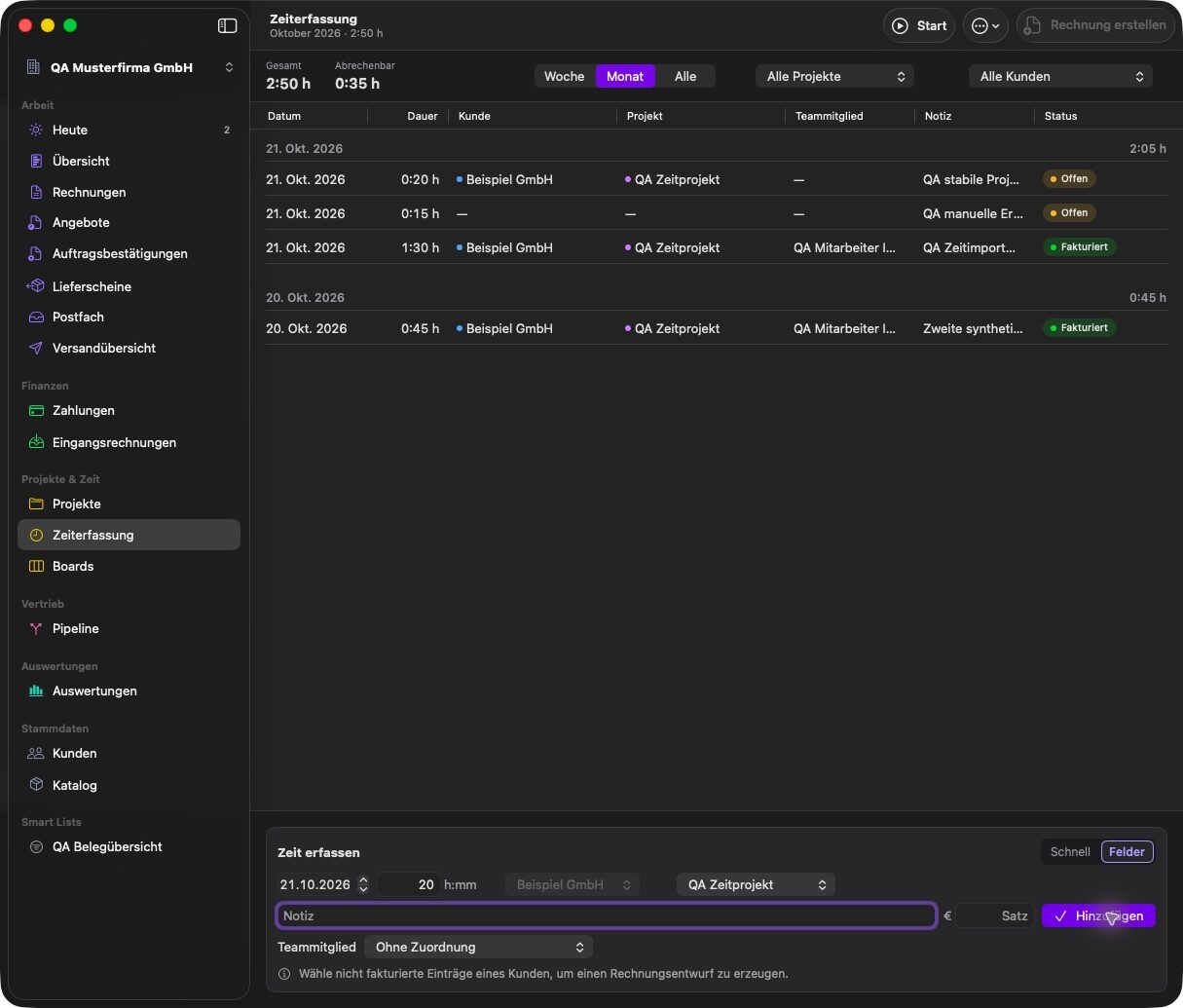
Toggl Track is a cloud time tracker with apps for the web, Mac, Windows and phones. It creates basic PDF invoices from reports, and its own help notes that the invoice layout cannot be changed and that paid status is not tracked. MacBusinessSuite also has a timer on the Mac and turns hours into invoice drafts, next to full quotes, invoices, e-invoices, projects and a CRM, in one native Mac app with local data.
. Written by Marcel R. G. Berger. Sources
The short answer
- Choose Toggl Track if time tracking across devices and teams is what you need, and invoicing happens in another tool such as QuickBooks.
- Choose MacBusinessSuite if you want the hours to flow straight into invoices, e-invoices and payment tracking in the same Mac app.
- Both have a timer on the Mac. The difference is what happens after the hours are tracked.
MacBusinessSuite and Toggl Track side by side
| MacBusinessSuite | Toggl Track | |
|---|---|---|
| Type of product | Native macOS app, one app for projects, CRM, time tracking and invoicing | Cloud time tracker with web, Mac, Windows, iOS and Android apps |
| Where the data lives | On your Mac, in the app's container. No account, no sync between devices | Cloud workspace; account required |
| Projects and tasks | Projects with status, budget, profitability and a project log; Kanban boards with tickets, subtasks and recurring tickets | Projects with templates, budgets, task estimates and alerts |
| CRM | Customers and contact persons, sales pipeline, customer and project log, IMAP mailbox, mail to ticket | Not documented |
| Time tracking | Built-in menu bar timer, manual entries, suggestions from the calendar, open hours to invoice | Timer, Pomodoro, idle detection, desktop and mobile apps |
| Invoices | Quotes with optional items, order confirmations, delivery notes, partial, final and recurring invoices, credit notes, dunning | PDF invoices from reports; layout cannot be changed; paid status not tracked |
| E-invoices | ZUGFeRD, Factur-X, XRechnung and EN 16931 as UBL or CII, Peppol BIS as a file. No sending through the Peppol network | Not documented |
| Accounting | OSS, reverse charge, US sales tax per state (one combined rate you maintain, only where you confirmed nexus), data for the German UStVA and ZM, DATEV batches, GoBD export. No direct filing | Sending to QuickBooks as a paid feature |
| Pricing model | Annual subscription in the Mac App Store, handled by Apple. Data stays readable and exportable after it ends | A permanent basic plan that needs no paid subscription, paid plans with a 30 day trial, Enterprise through sales |
Where Toggl Track is ahead
- Time tracking on every platform, including Windows and browser extensions.
- Team features for many users, plus integrations with Jira, Asana and GitHub.
- Project templates and alerts for budgets.
Where MacBusinessSuite is ahead
- Full invoicing: quotes, invoices, credit notes, recurring invoices, dunning and payment matching.
- E-invoices as ZUGFeRD, Factur-X, XRechnung, EN 16931 and Peppol BIS file.
- A CRM with pipeline and mailbox, and Kanban boards per project.
- Local data with no account.
For companies working in several countries
Toggl Track's official pages used for this comparison do not document invoice languages, currencies or tax handling, since invoicing is not its focus.
MacBusinessSuite bills tracked hours in the customer's language and currency, with OSS, reverse charge and US sales tax. Read more on the international features.
Questions and answers
Is MacBusinessSuite a Toggl Track alternative?
For a freelancer or small team on one Mac who also needs invoicing, yes. For a larger team tracking time across Windows, Mac and phones, Toggl Track fits better.
Can Toggl Track create invoices?
It creates PDF invoices from reports. According to Toggl's help, the layout cannot be changed and there is no built-in way to mark time entries on an invoice as paid.
Can I import my Toggl hours into MacBusinessSuite?
MacBusinessSuite imports hours from CSV files. There is no direct connection to Toggl Track.
Sources
Statements about Toggl Track come from the vendor's own pages listed here, read in October 2026. Statements about MacBusinessSuite come from the app's documentation.
- Toggl Track, features (toggl.com)
- Toggl Track help, creating invoices
- MacBusinessSuite features on this site
Toggl Track is a trademark of its owner and is offered by Toggl. The name is used here only to identify the product. MacBusinessSuite and DigitalFreedom Global LLC are not affiliated with Toggl, and Toggl has not reviewed or endorsed this page.
If a statement here is out of date, write to hello@digitalfreedom.co.za and we will check it and correct the page.