
GrandTotal comparison, October 2026
Ease of use and macOS, GrandTotal and MacBusinessSuite
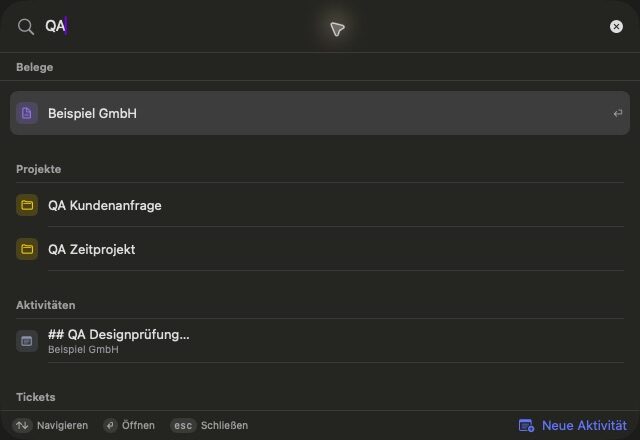
Both are Mac-only apps that follow macOS conventions. MacBusinessSuite documents widgets, Shortcuts, AppleScript, Spotlight, a menu bar timer and a Focus filter per company, with the interface in 15 languages. GrandTotal documents plugins, scripting, an MCP server and Ask GrandTotal, an in-app assistant that works with AI coding agents. Its interface languages are not documented.
. Written by Marcel R. G. Berger. Sources
Side by side
| MacBusinessSuite | GrandTotal | |
|---|---|---|
| Requirement | macOS 15 or later | macOS 10.15 or later |
| Menu bar | Timer and Today counter in the menu bar | Not documented |
| Widgets | Open items, Today and timer | Not documented |
| Shortcuts | Search records, create tickets, start the timer, export PDFs | Not documented |
| AppleScript and scripting | AppleScript dictionary | Scripting (XL edition), plugins for import and export |
| Search | Command K and Spotlight | Not documented |
| AI | Optional, on device with Apple's model (macOS 26, a compatible Mac and Apple Intelligence); OpenAI only for activity texts with your own key | Ask GrandTotal with Claude Code, Codex, Gemini CLI or Mistral Vibe; MCP server; proofreading with Writing Tools |
| Interface languages | 15 | Not documented |
What GrandTotal offers here
- Plugins for import and export, which can be built with AI help.
- An MCP server and Ask GrandTotal for AI agents.
- Proofreading with macOS Writing Tools.
What MacBusinessSuite offers here
- Widgets, Shortcuts, AppleScript, Spotlight and Command K.
- Notifications with actions and a Focus filter per company.
- Its own calendar and reminders list for due dates.
- The interface in 15 languages, light and dark mode.
Questions and answers
Which macOS version do the apps need?
MacBusinessSuite needs macOS 15 or later; its optional on-device AI needs macOS 26, a compatible Mac and Apple Intelligence. GrandTotal needs macOS 10.15 or later, according to its product page.
Does either app use AI?
Both do, optionally. MacBusinessSuite uses Apple's on-device model and nothing is booked or sent automatically. GrandTotal works with AI agents such as Claude Code or Codex through Ask GrandTotal and offers an MCP server.
Sources
Statements about GrandTotal come from the vendor's own pages listed here, read in October 2026. Statements about MacBusinessSuite come from the app's documentation.
- GrandTotal, product page with the S, M, L and XL feature lists (mediaatelier.com)
- GrandTotal, German product page (mediaatelier.com)
- GrandTotal 10, release article
- Support and release notes
- Licenses
- Collaboration
- Integrations
- Time tracking
- XRechnung
- E-invoices in Belgium and the Peppol network
- Inbound invoices
- Web Access
- Interactive estimates
- CAMT import
- Compatibility and version history
- PDF/A archive format
- Swiss QR bill
- SEPA QR codes
- Cumulative partial invoices
- Customer care, statistics and labels
- Migration
- New file format
- Sync setup
- Making Tax Digital
- Swiss VAT return
- Send to bookkeeping
- Ask GrandTotal
- MCP server
- Privacy policy (connections to Media Atelier servers)
- Imprint
- MacBusinessSuite features on this site
GrandTotal is a trademark of its owner and is offered by Media Atelier. The name is used here only to identify the product. MacBusinessSuite and DigitalFreedom Global LLC are not affiliated with Media Atelier, and Media Atelier has not reviewed or endorsed this page.
If a statement here is out of date, write to hello@digitalfreedom.co.za and we will check it and correct the page.